Table of Contents
- Introduction
- What is the Watercolor Sari Portrait Prompt?
- The Science of Layered Pigment Simulation
- Key Features
- Copy & Paste Prompt
- Full Prompt Access
- Best Use Cases
- Pro Tips for Texture & Depth
- FAQs
- Conclusion
Introduction
Digital art is evolving beyond photorealism. In 2026, the trend has shifted toward painterly abstraction. This Watercolor Sari Portrait prompt, featured in our AI Prompts Library, allows creators to blend traditional cultural elegance with the soft, organic chaos of wet-on-wet painting techniques.
What is the Watercolor Sari Portrait Prompt?
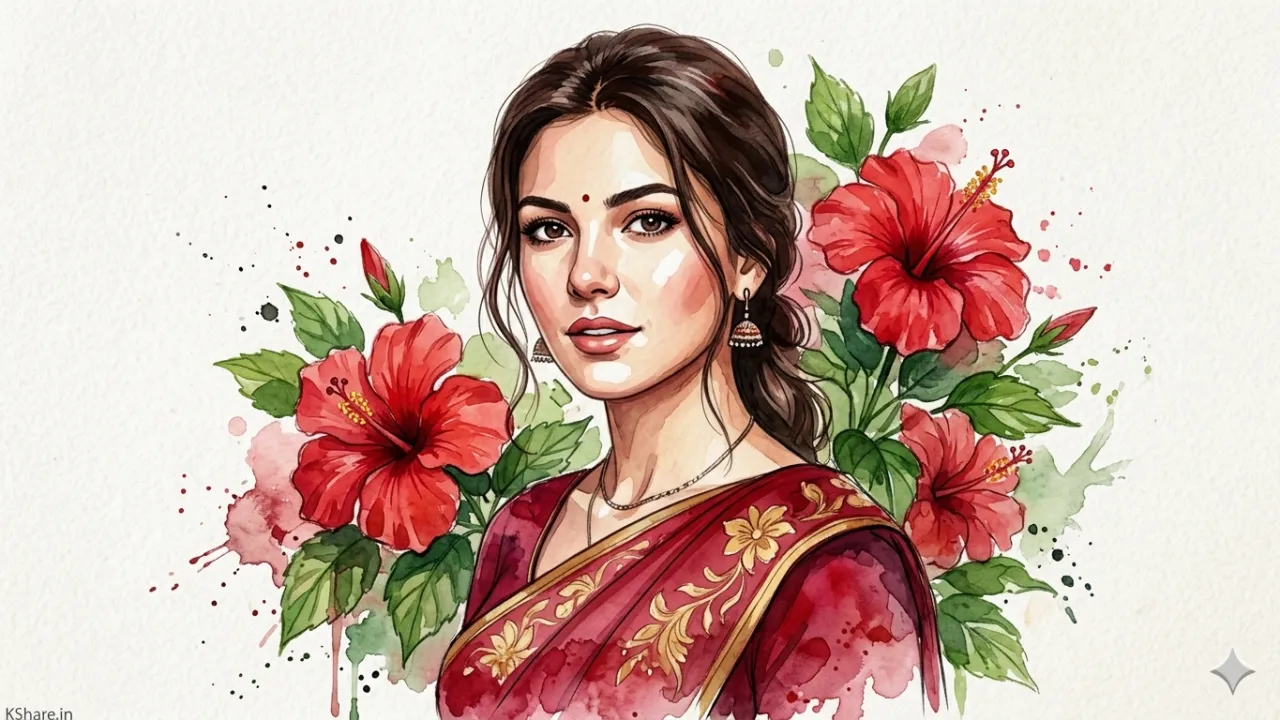
This prompt is a specialized configuration designed to simulate the physical behavior of watercolor pigments on cold-press paper. It utilizes identity mapping to keep facial structures sharp while diffusing the environment into a dreamlike floral composition of hibiscus and heart-shaped clouds.
Why This Technique is Trending
While high-flash photography is popular for realism, watercolor styles are dominating the lifestyle and editorial niches. It provides a “hand-painted” soul to AI-generated content, making it perfect for branding, high-end invitations, and social media storytelling.
Key Features
- Pigment Bleeding: Real-time simulation of ink spreading across fibers.
- Identity Preservation: High-fidelity facial geometry mapping.
- Textured Paper Grain: Adds a tactile, premium feel to the digital render.
- Depth-Aware Blending: Seamlessly integrates the subject with floral elements.
📋 Copy & Paste Prompt
A high-resolution watercolor portrait of a young woman with almond-shaped eyes, natural skin tones, and hair tied back in a neat bun. She is wearing a royal blue sari with intricate gold-threaded embroidery and traditional fine jewelry. Background features soft-pink blooming hibiscus flowers and a heart-shaped cloud in a clear blue sky. Apply stylized watercolor rendering: layered pigment simulation, visible paper grain, ink splashes, and soft edge diffusion. Lighting: soft ambient diffused light. Composition: rule-of-thirds, 2:3 aspect ratio, slightly tilted artistic alignment. --ar 2:3 --stylize 750 --v 6.0
Full Prompt Access
You can find the complete logic, including temperature settings (0.85) and Top-P values, in our dedicated library:
👉 Get Prompt: Watercolor Sari Portrait Prompt
Best Use Cases
- Digital Branding: For creators focusing on heritage and fashion.
- Social Media Posts: Perfect for aesthetic-driven platforms like Instagram and Threads.
- Wall Art Prints: The high stylization makes it ideal for physical decor.
Pro Tips
- Adjust the Stylize Parameter: Lower it for more realism; crank it up for maximum abstraction.
- Contrast Control: Use “gold detailing” keywords to ensure the jewelry pops against the soft watercolor background.
- Lighting: Always specify “soft diffused light” to maintain the luminosity of the paint. For more lighting techniques, see our guide on Cinematic Lighting AI Prompts.
FAQs
Q: Does this work for any clothing type? A: Yes, though it is optimized for the intricate folds and embroidery of a Sari.
Q: Can I use this in Stable Diffusion? A: Absolutely. Focus on using “Watercolor Lora” or “Ink Splash” weights for the best results.
Conclusion
Blending the old with the new is the hallmark of a great artist. By using this watercolor workflow from our AI Art Prompts collection, you aren’t just generating an image; you are crafting a digital painting that carries the weight of traditional craftsmanship.