Table of Contents
- Introduction
- What is the Pencil Sketch AI Prompt?
- Why Graphite Sketches are Trending
- Key Features
- Copy & Paste Prompt
- Full Prompt Access
- Best Use Cases
- Pro Tips for Realistic Shading
- FAQs
- Conclusion
Introduction
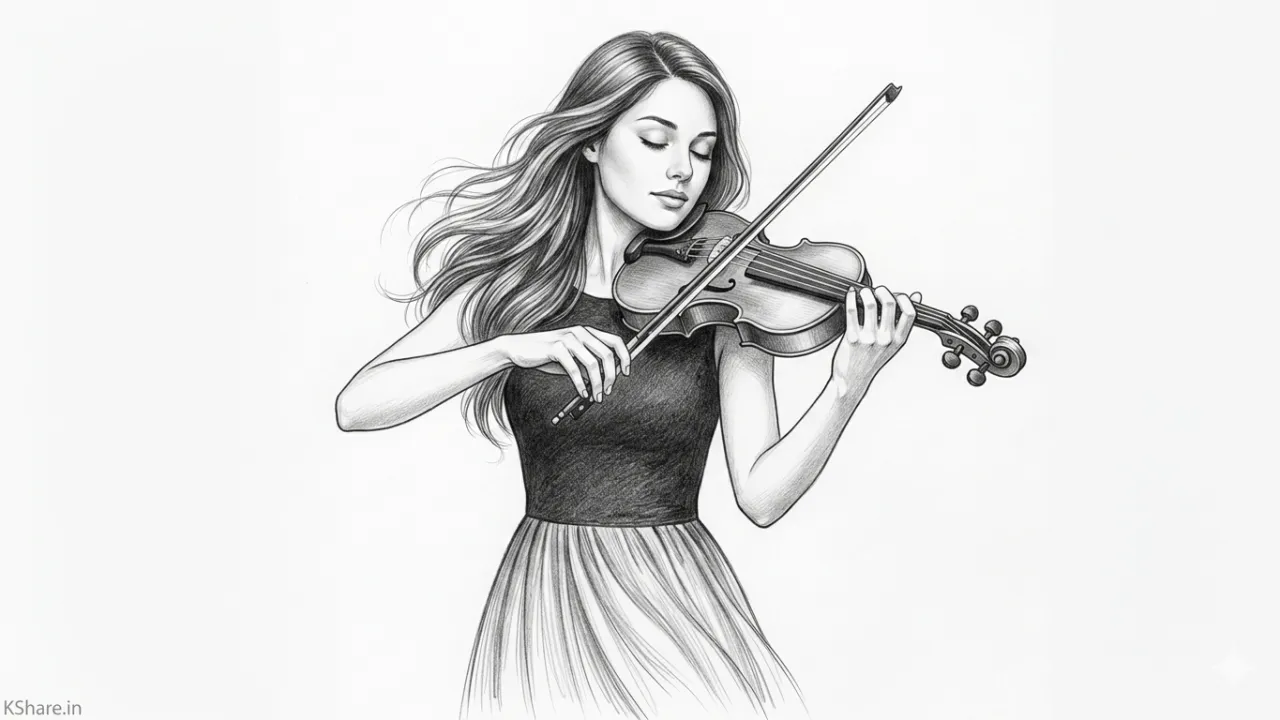
Creating a realistic pencil sketch of a girl playing violin used to take hours of manual labor and years of practice. In 2026, AI has bridged that gap. With our specialized Pencil Sketch AI Prompt from the KShare AI Prompts Library, you can generate professional-grade graphite drawings that capture every nuance of emotion and musicality instantly.
What is the Pencil Sketch AI Prompt?
This prompt is a finely-tuned instruction set designed to emulate the texture of HB, 2B, and 4B graphite pencils. It focuses on soft-edge diffusion and cross-hatching techniques to ensure the final output doesn’t just look like a filter, but like a genuine hand-drawn masterpiece on textured paper.
Why Graphite Sketches are Trending
While vibrant digital colors are everywhere, the timeless elegance of a monochrome sketch provides a sense of nostalgia and raw artistry. These sketches are currently dominating editorial illustrations and minimalist social media aesthetics, offering a “back-to-basics” feel that stands out in a crowded digital landscape.
Key Features
- Realistic Shading: Simulates professional graphite blending for smooth skin tones.
- Fine Detail: Captures the intricate strings of the violin and the texture of the bow.
- Expressive Depth: Uses contrast to highlight the subject’s focus and posture.
- Textured Grain: Adds subtle paper grain for a tactile, premium finish.
📋 Copy & Paste Prompt
A highly detailed pencil sketch of a young girl playing a violin, professional graphite drawing on textured white paper. Soft shading, realistic cross-hatching, and fine pencil strokes. The lighting is dramatic yet soft, highlighting her focused expression and the wooden texture of the violin. Elements of charcoal smudges for an authentic hand-drawn feel. High contrast, sharp focus on the violin strings, artistic composition. --ar 3:4 --v 6.0 --stylize 250
Full Prompt Access
For advanced settings, including negative prompts to avoid “digital smoothness” and custom lighting parameters, visit the official prompt page:
👉 Get Prompt: Pencil Sketch AI Prompt
Best Use Cases
- Music Blog Headers: Perfect for articles about classical music or learning instruments.
- Personalized Gifts: Generate custom sketches to print and frame.
- Social Media Content: Stand out on Pinterest and Instagram with a minimalist, artistic vibe.
Pro Tips
- Paper Texture: If the sketch looks too “clean,” add keywords like “rough paper grain” or “charcoal dust” to increase authenticity.
- Focus on Hands: If the AI struggles with finger placement, add “anatomically correct hands holding violin bow” to your specific instructions.
- Lighting Contrast: Use “Chiaroscuro lighting” for a more dramatic, moody sketch. Explore more styles in our guide on Cinematic Lighting.
FAQs
Q: Can I change the subject?
A: Absolutely! Simply replace “young girl playing violin” with any subject of your choice while keeping the technical pencil parameters.
Q: Does this work with ChatGPT/DALL-E?
A: Yes, though it is optimized for Midjourney and Gemini. For DALL-E, ensure you emphasize “hand-drawn graphite” to avoid a plastic look.
Conclusion
Mastering the art of digital sketching is all about the prompt logic. By using this workflow from our AI Art Prompts collection, you are leveraging the power of modern AI to create timeless, soul-stirring art. Start creating your masterpiece today!